


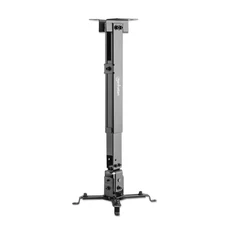
Whether you’re setting up a cozy home theater or equipping a classroom for lessons and presentations, the right projector ceiling mount can make all the difference. A properly selected and installed mount improves image quality, enhances viewing comfort, increases safety, and ensures that your investment performs reliably for years.
Choosing the right mount isn’t always straightforward, though. With so many options on the market and with varied room layouts, ceiling types, and projector models it’s easy to feel overwhelmed.
This guide simplifies the process. You’ll learn what matters most when selecting a projector ceiling mount for both home theater and classroom environments, backed by practical advice and real-world experience.
1. Why Ceiling Mounts Matter for Projectors
Unlike TVs, projectors often don’t have a permanent flat surface behind them. Placing the projector on a table or shelf can lead to:
-
Image distortion and alignment issues
-
Obstructions from people walking in front
-
Risk of bumps or falls
-
Poor cable management
A ceiling mount solves these problems by:
-
Providing a stable installation point
-
Fixing the projector at the ideal throw distance
-
Hiding cables cleanly
-
Improving visual comfort and image alignment
Whether for a bright lecture hall or a dim home theater, a ceiling mount helps you make the most of your projector investment.
2. Fixed vs Adjustable Projector Ceiling Mounts
Before shopping, it helps to understand the basic types of mounts.
Fixed Mounts
-
Great for rooms with a single ideal screen position
-
Simple and cost-effective
-
Minimal moving parts = reliability
Best for:
Home theaters
Dedicated screening rooms
Adjustable Mounts
-
Allow tilt and swivel adjustments
-
Ideal for correcting alignment
-
Useful when seating changes often
Best for:
Classrooms
Multi-purpose spaces
Training rooms
Full-Motion Mounts (Ball-Joint or Swivel Arms)
-
Maximum flexibility
-
Easy repositioning without remounting
-
Great for irregular room layouts
Best for:
Rooms with multiple screen locations
AV setups shared across activities
3. Key Factors to Consider Before You Buy
A. Ceiling Type and Structure
The most important safety consideration is ensuring your ceiling can support the projector and mount. Common ceiling types include:
-
Drywall with joists requires anchoring into joists or using support plates
-
Concrete or solid ceilings excellent load support, but need masonry hardware
-
Drop ceilings need support bars or backer boards installed above grid
B. Projector Weight and Mount Capacity
Every mount has a maximum load rating. Make sure your selected mount is rated above the weight of your projector, including any accessories (lens, housings).
Best Practice: Choose a mount with at least 20–30% more capacity than your projector’s weight for safety and stability.
C. Throw Distance and Mount Positioning
Before buying a mount, know your projector’s throw distance: the distance between the projector lens and the screen for the desired image size. The mount must position the projector precisely at this spot.
Use:
-
Projector manual or online calculator
-
Screen size and throw ratio to map position
Proper measurement prevents distortion and ensures the image fills the screen correctly.
D. Adjustability & Fine-Tuning
A good ceiling mount should allow:
Tilt (up/down)
Swivel (left/right)
Roll or yaw for micro alignment
Tool-free adjustments when possible
Even small misalignment can cause image skew or keystone problems that’s where adjustability becomes essential.
E. Cable Management
Projectors often require power, HDMI, VGA, or network cables. A ceiling mount with built-in cable channels or space for bundling cables provides a clean, professional setup and reduces wear on connectors.
4. Best Ceiling Mounts for Home Theater Projectors
For home theater setups, aesthetics and simplicity matter almost as much as performance.
Top Features Home Users Should Look For
-
Low-profile designs (keeps projector closer to the ceiling)
-
Tool-free adjustment knobs
-
Internal cable routing
-
Compatible with various projector brands
Recommended Mount Types for Home
-
Fixed mounts for dedicated theaters
-
Adjustable tilt mounts for seating angles
-
Full-motion mounts if the projector also serves multiple screen sizes
Popular Options
Universal Adjustable Ceiling Mounts — Great all-around mounts that fit most projectors
Low-Profile Fixed Mounts — Perfect for minimalist home installations
Swivel Ball Mounts — Excellent for angled mounts or vaulted ceilings
5. Best Ceiling Mounts for Classroom and Educational Spaces
Classrooms need flexibility, durability, and ease of use.
Key Features for Classroom Use
-
Robust construction for heavy daily use
-
Easy repositioning by AV staff
-
Wide tilt and swivel range
-
Good cable management with labels or clips
-
Compatibility with ceiling heights and projector types
Recommended Mount Types for Classrooms
-
Heavy-duty adjustable mounts
-
Swivel and tilt models with locking features
-
Extendable pole mounts for high ceilings
Why Durability Matters
Classroom projectors typically run more hours than home units. A mount that can handle repeated adjustments and heavy use is essential.
6. Installation Tips: Get the Most Out of Your Ceiling Mount
Proper installation ensures performance and safety.
Step-By-Step Installation Tips
-
Locate structural support using a stud finder or ceiling scanner
-
Measure throw distance before marking holes
-
Level the bracket before tightening bolts
-
Use appropriate hardware for ceiling type (anchors, lag bolts, concrete screws)
-
Route cables before securing final mount
-
Adjust image alignment with tilt and swivel
Avoid Common Installation Mistakes
Mounting only into drywall
Ignoring projector weight ratings
Skipping cable shielding or management
Not accounting for future projector upgrades
Proper planning and measuring ensures you never compromise image quality or safety.
7. Fine-Tuning Your Projector Setup After Mounting
Once the mount is installed and the projector is in place, there are a few final adjustments that make a big difference:
Image Alignment
-
Adjust horizontal and vertical position
-
Center the image using projector controls
-
Check for keystone distortion
Focus and Clarity
-
Use manual focus if available
-
Lock zoom and focus once perfect
Lighting Considerations
-
Reduce overhead glare
-
Use blackout curtains for daytime use
-
Consider ambient light when placing screens
Well-aligned projectors look better and are easier on the eyes.
8. Maintenance and Long-Term Care
Ceiling-mounted projectors are largely out of sight but not out of mind.
Routine Checks
-
Tighten mount bolts annually
-
Inspect cables for wear
-
Clean projector vents and lens
-
Verify tilt/swivel settings
Regular maintenance increases longevity and keeps your visuals crisp and bright.
9. Final Thoughts: Making the Right Mount Choice
The best ceiling mount for your projector isn’t just about compatibility, it's about performance, safety, ease of use, and long-term reliability.
Whether you’re building a dedicated home theater or equipping a classroom, the right mount ensures:
-
Proper image alignment
-
Comfortable viewing angles
-
Safe and sturdy installation
-
Clean cable management
-
Lower maintenance over time
By considering the factors above weight capacity, adjustability, ceiling type, cable management, and use case you’ll choose a mount that supports your projector and your space.

 English
 Arabic
 Spanish
 Portuguese
 Deutsch
 Turkish
 Dutch
Dutch
 Italiano
 Russian
 Romaian
 Portuguese (Brazil)
 Tiếng Việt